Audit trail
The audit trail records who changed a flag, what they changed, and when. Azure's revision history records values but no actor, so Flagsweep records the signed-in user on every write it makes.
Open it from Audit under a connection in the sidebar. Every signed-in user can read it.
Reading an entry
Entries are listed newest first as cards. Each card shows:
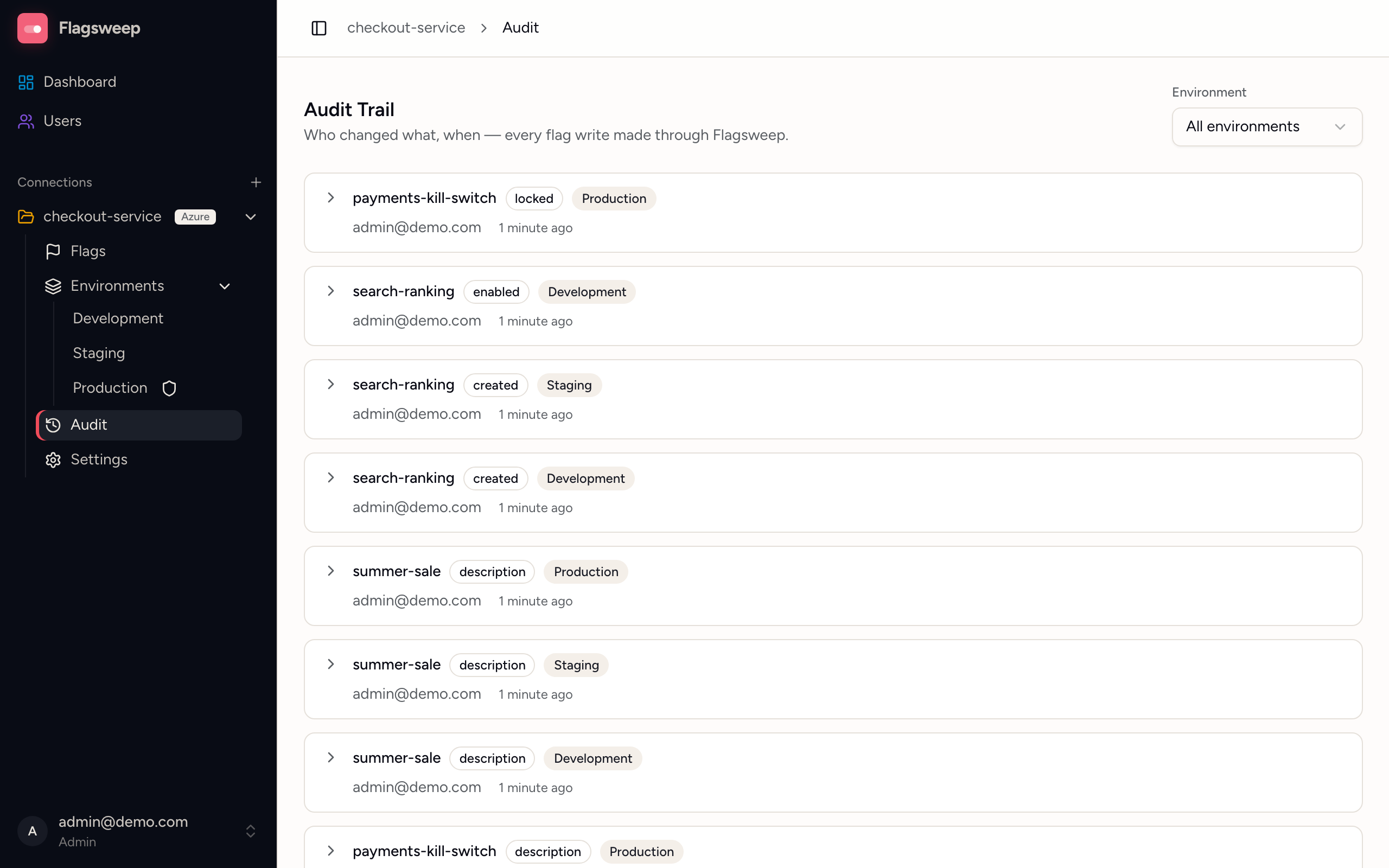
- the flag ID,
- what changed, as a field name such as
enabledor a count like 3 fields, - the environment,
- the email of the person who made the change,
- how long ago, with the exact time on hover.
Click the chevron to expand a card. The table beneath lists each field with its From value in red and To value in green. A dash means the value was empty.
Times are the store's own last-modified timestamps where Azure provides them, so they line up with what the Azure portal shows.
What is recorded
| Field in the entry | When it appears |
|---|---|
created | A flag was created. The To value is its initial state |
enabled | A flag was toggled |
displayName, description | Name or description edited |
isPermanent, expiresAt | Permanent flag switched, or retire-by date changed |
locked | A flag was locked or unlocked in the store |
deleted | A flag was deleted |
Only fields that actually changed are recorded. Saving an edit that changes nothing writes nothing.
One entry covers one flag in one environment. A change made across environments (Apply changes on a flag's page, or editing or deleting the flag as a whole) is written to each environment separately, so it lands as one entry per environment, all attributed to you. A copy that is added and switched on produces two entries: the flag is created disabled, then enabled.
What is not recorded
- Changes made outside Flagsweep. The portal, CLI, SDKs, and pipelines write straight to Azure. Those show up as an Out of sync badge on the flag, not as audit entries.
- Owner assignments. Ownership is Flagsweep metadata and is not currently audited.
- Administration: creating connections, environments, users, or invitations, changing a connection's connection string, and sign-ins.
- Writes to labels that are not mapped to an environment. Flagsweep only writes through environments, so in practice this does not occur.
Filter and page
- The Environment select at the top narrows the list to one environment. The choice is kept in the URL, so the filtered view can be bookmarked or shared.
- Fifty entries load at a time. Click Load more at the bottom for older ones.
There is no search, actor filter, date filter, or export today.
Attribution after account changes
An entry keeps its author's email after that user is deleted. If a user is restored by re-invitation, they get the same account back and their history remains theirs.
Deleting an environment deletes its audit entries. Deleting a connection deletes all of that connection's entries.
Retention
Entries are kept indefinitely in Flagsweep's database. Back up the data volume as described in Data and backups if the history matters to you.