FeatureOps on top of the feature flags in your cloud.

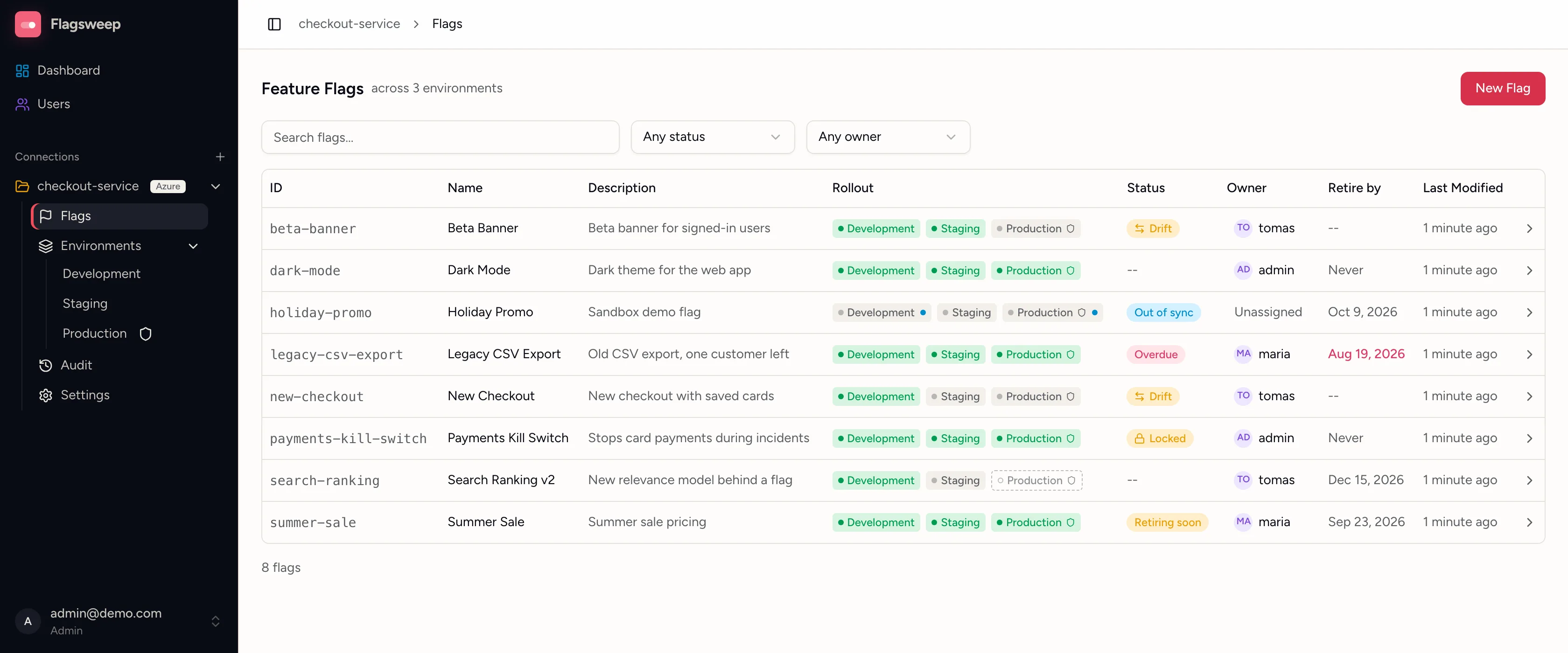
The Flagsweep flag list: every flag's rollout across Development, Staging and Production, with Drift, Out of sync, Overdue, Retiring soon and Locked badges, owners and retire-by dates

What is Flagsweep?

Flagsweep is a self-hosted FeatureOps layer on top of the feature flags in your cloud. Your flags stay in your cloud's store, Azure App Configuration today and AWS AppConfig soon, and Flagsweep adds what the console lacks: an attributed audit trail, drift detection, locks, protected environments, owners, and retire-by dates.

Temporary flags have a way of becoming permanent. Flagsweep gives each one an owner and a retire-by date, and records who changed it, when, and what it was before.

Getting started

Run the command below, then open localhost:8080, create the admin account and connect your store.

docker run -d --name flagsweep \
  -p 8080:8080 \
  -v flagsweep-data:/app/data \
  ghcr.io/flagsweep-hq/flagsweep:latest

Features

  • Audit trail

    Every change shows who made it, when, and what it was before.

    Audit trail →
  • Out of sync and drift

    A flag changed outside Flagsweep is marked Out of sync. One switched differently from production is marked Drift.

    Out of sync and drift →
  • Protection and locks

    Protect production so only admins can change it. Lock a flag so nobody can.

    Locks and protection →
  • Owners and expiry dates

    Every flag has an owner and a retire-by date, so old flags get cleaned up.

    Managing flags →
  • Every environment at a glance

    One row per flag shows where it is on, off, or not set yet. You can change any of them from the flag's own page.

    Flags across environments →
  • Team access

    Invite people with a link as admins or members. They do not need permissions in your cloud account.

    Team and access →

Providers

Editions

Open source Available now

Free, and runs on your own infrastructure.

Your flags and your audit history never leave your control. Your apps keep reading your cloud's store with the libraries and credentials they already use, so there is no Flagsweep SDK to install and no new keys to hand out.

  • No limits and no per-seat pricing
  • One container to run, one folder to back up
  • Apache-2.0 licence
Install it

Enterprise

For teams with governance and compliance needs.

Everything in open source, plus

  • Approval workflows: an engineer requests a change, product approves it
  • Single sign-on (SSO) with your identity provider
  • Drift alerts
  • Azure DevOps and GitHub integrations, with CI gates in your pipelines
  • Feature requests welcome: tell us what your team needs
Contact us
Compare all features
FeatureOpen source (self-hosted)Enterprise (self-hosted)
Governance
Flag management
Attributed audit trail
Out-of-sync detection
Drift between environments
Protected environments
Flag locks
Flag ownership
Retire-by dates
Team and access
Providers
Azure App Configuration
AWS AppConfigComing soonComing soon
Enterprise
Approval workflows—Planned
Single sign-on (SSO)—Planned
Drift alerts—Planned
Azure DevOps integration—Planned
GitHub integration—Planned
CI gates—Planned
LicenceApache-2.0Commercial Planned

FAQ

Is Flagsweep free?

Yes. The open-source edition runs on your own infrastructure under the Apache-2.0 licence, with no limits and no per-seat pricing. The Enterprise edition is planned, with approval workflows, single sign-on, drift alerts and CI integrations, and will be sold under a commercial licence. There are no public prices yet.

How is Flagsweep different from the Azure portal?

The portal is for people with Azure access, and its revision history records values but no actor. Flagsweep records the signed-in user on every write, marks flags changed in Azure directly, protects environments so only admins can change them, and gives each flag an owner and a retire-by date. People without Azure access can see and change flags.

Does Flagsweep replace my feature flag SDK?

No. Your applications keep reading flags from your cloud's store with the SDKs they already use. Flagsweep writes to the same store, and leaves feature filters and variants set in the console as they are.

What do I need to connect a store?

A read-write connection string for the store, from Settings > Access keys in the Azure portal. Flagsweep checks that it can connect, reads the store's labels, and maps each environment to one label. The connection string is stored as plain text unless a DataProtection secret key is set, and encrypted when it is.

Do my flag values leave my cloud?

No. Flags live in your provider's store and Flagsweep writes to it directly. The self-hosted edition keeps its own database, with the audit trail and user accounts, on your infrastructure.

What happens to feature filters and variants I set in the console?

Flagsweep keeps them as they are on every write. It manages the boolean on/off state, ownership, and lifecycle, and never rewrites targeting rules.

Which providers are supported?

Azure App Configuration today. AWS AppConfig is next, with the same audit trail, out-of-sync detection, locks, and lifecycle. Mixed Azure and AWS connections will work in one Flagsweep.

Does Flagsweep work with AWS AppConfig?

Not yet. AWS AppConfig support is coming soon, with the same attributed audit trail, out-of-sync detection, locks, owners and retire-by dates as Azure App Configuration, and Azure and AWS connections will work side by side in one Flagsweep. Your applications will keep reading flags with the AWS AppConfig SDK they already use. If you want it sooner, tell us on the contact page.

What is the licence?

The open-source edition is licensed under the Apache License 2.0. You can run it, modify it, and use it inside closed-source and commercial products, as long as you keep the licence and notice files. The licence does not cover the Flagsweep name or logo. The planned Enterprise edition adds closed-source features and will be sold under a commercial licence.

Where do I ask a question or suggest something?

In the Discussions tab of the GitHub repository: Q&A for questions, Ideas for suggestions, and Show and tell for what you built. Bugs go in Issues. Every release is announced there with a thread for feedback, and the contact page reaches us directly for anything private.